 Русский
 English
 العربية
 简体中文
 Türkçe
 Беларуская
 Română
 ქართული
 Հայերեն
 Azərbaycanca
 Қазақша
 Oʻzbekcha
 Кыргызча
 Тоҷикӣ
 Türkmençe
 हिन्दी
 Français
 Español
 한국어
 XWalletFor servicesSoonXWalletUniversal
What you get
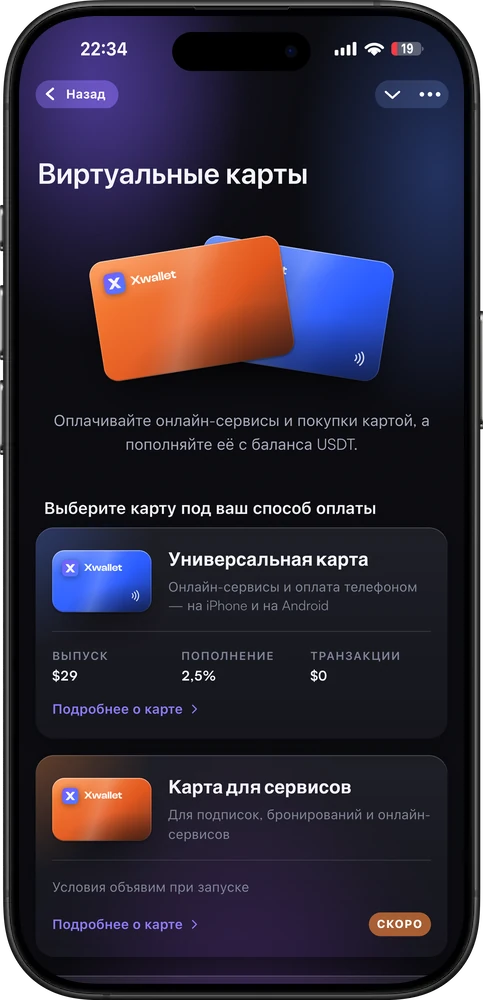
One card — online and on your phone
- UniversalPay with card details in online services and by phone — via Apple Pay and Google Pay.
- For services — coming soonIn development. Online payments with card details only: does not work at terminals, in Apple Pay or Google Pay.
- Top-up from your USDT balanceFee — 2.5%. The debit amount and the amount credited are on the screen before you confirm.

Good to know
No fine print
How it works
4 steps in the app
- 1Open “Cards”On the app’s home screen.
- 2Choose a card“Universal” is being issued now; “For services” is coming soon.
- 3Settings and confirmationFull breakdown — before payment.
- 4Issue statusThe card will appear in “My cards”.
Questions
The essentials
How is “Universal” different from “For services”?
“Universal” — pay with card details in online services and by phone via Apple Pay and Google Pay. Only this card is being issued now. “For services” is in development: online payments with card details only, no terminals, Apple Pay or Google Pay.
How do I top up the card?
From your XWallet USDT balance, fee — 2.5%. The debit amount and the amount credited are on the screen before you confirm.
How much does the issue cost?
$29. Top-up — 2.5%, purchases — no fee, currency conversion — 2% (no fee when paying in SGD), closing the card — $1. Declined transactions are free, no hidden fees.
What are the card limits?
From $1 to $15,000 per payment. No monthly limits.
Do I need verification?
The app shows the terms before issuing.
Where can I see the card details?
In the card details, masked, with copying by field.
More in XWallet
Related features
Virtual cards
Get a card for $29.
“Universal” — online services and phone payments via Apple Pay and Google Pay. Top-up from your USDT balance — 2.5%, purchases with no fee. “For services” — coming soon.
Open in Telegram